









Your School
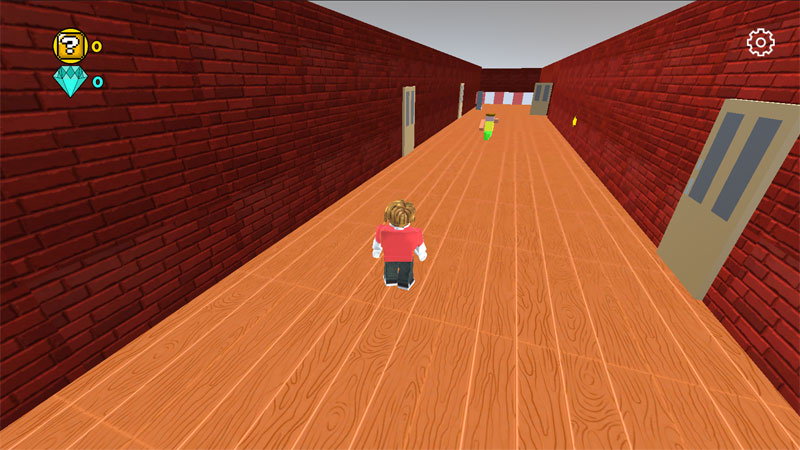
Bright blocky aesthetics meet classic Obby platforming in Your School, a vibrant 3D escape game inspired by Roblox aesthetics. Players must sprint, leap, and puzzle their way through a locked-down campus. The journey takes you from bustling classrooms all the way down into hidden underground chambers.
Navigating campus hazards and dungeon traps
Escaping requires sharp timing and a strong understanding of momentum. Each zone introduces distinct environmental obstacles that demand quick adaptation.
School corridors: High-speed Obby course
The upper levels focus on classic platforming speed. Navigating hallway corridors involves hopping over moving lockers, dodging swinging doors, and clearing wide floor gaps. Precision jumps matter most here. Over-shooting a ledge often sends players tumbling back to the last checkpoint.
Underground dungeons: Puzzles and dark pitfalls
Descending beneath the facility shifts the focus toward environmental puzzles and hidden hazards. Dungeons trade wide-open hallways for narrow balance beams, collapsing stone platforms, and timed laser grids. Observing trap patterns before making a move is critical to surviving these lower levels.
Balancing accessible controls with scaling challenge
Movement controls feel responsive and lightweight. This setup allows casual gamers to pick up the basics immediately. However, later stages demand advanced jump timing and air control.
Pacing scales smoothly across the escape route. Early levels let players build confidence with straightforward gap jumps. Later zones combine moving platforms with environmental traps, forcing players to react quickly while solving room puzzles under pressure.
Essential tips for a clean escape
- Camera control is everything: Adjust the third-person view directly above your character during tight platforming sections to gauge landing spots accurately.
- Watch platform reset timers: Collapsing floors usually flash twice before dropping. Use that visual cue to time your sprint off the edge.
- Buffer your jumps: Tap the jump button right as your feet touch the edge of a ramp to preserve forward velocity across wide gaps.
Control
- Move: W, A, S, D
- Jump: Space
- Pressing the right mouse button causes the camera to rotate